
Automation Consultant

Top Benefits of Hiring an Automation Consultant for Your Business

Automation Consultant

Every business wants to move faster, waste less time, and operate with precision. But somewhere between strategy and execution, processes get messy. Teams juggle repetitive tasks, systems don’t talk to each other, and inefficiencies quietly drain productivity.

That’s where automation comes in, and more importantly, where Automation Consultant makes all the difference.

Hiring an automation consultant isn’t just about adding technical support. It’s about bringing in a strategist who can see your entire operation, pinpoint where automation creates the most value, and design systems that actually deliver results.

Let’s break down the top benefits of hiring an automation consultant and why it can be one of the smartest moves your business makes.

What Does an Automation Consultant Do?

Before diving into the benefits, it helps to understand the role itself.

An automation consultant specializes in analyzing existing workflows, identifying opportunities to streamline processes, and implementing tools and technologies that handle repetitive or rule-based tasks automatically.

Their goal isn’t to replace people it’s to make work smarter, faster, and more accurate.

Typical responsibilities include:

  • Mapping and analyzing business processes.
  • Recommending automation tools that fit your needs.
  • Designing and implementing automated workflows.
  • Integrating multiple systems to share data seamlessly.
  • Training staff to use and manage automated systems.
  • Monitoring and optimizing automations for continuous improvement.

Think of them as architects for efficiency building digital systems that keep your business running smoothly without constant manual intervention.

1. Expertise That Saves Time and Avoids Costly Mistakes

One of the biggest advantages of hiring an automation consultant like the ones at Flow Digital is experience.

Automation is powerful, but it’s also complex. With countless platforms, integrations, and use cases, it’s easy to waste time and money experimenting without a clear plan. A consultant brings deep technical knowledge and a proven approach, helping you:

  • Choose the right tools for your goals.
  • Avoid overcomplicated setups.
  • Prevent data silos or broken integrations.
  • Design processes that scale instead of break.

Instead of learning by trial and error, you get results faster and with fewer headaches. The consultant’s expertise ensures your automation strategy is efficient from day one.

2. A Fresh, Objective Look at Your Processes

When you work inside a business every day, inefficiencies can become invisible. The small manual tasks that eat away at productivity — entering data, sending reminders, moving files — often go unnoticed because “that’s just how we do things.”

An automation consultant provides an outside perspective. They see your operations with fresh eyes and can spot patterns that internal teams miss.

By observing workflows objectively, they identify:

  • Redundant steps that can be eliminated.
  • Manual tasks that are perfect candidates for automation.
  • Bottlenecks where approvals or data flow slow things down.
  • Gaps between systems that cause information loss.

This kind of unbiased analysis helps uncover opportunities for efficiency that would otherwise stay buried in the day-to-day routine.

3. Tailored Automation Strategies (Not One-Size-Fits-All)

Every business is different. What works for a manufacturing company won’t necessarily fit a service-based firm. That’s why plug-and-play automation solutions often fall short.

An automation consultant takes a customized approach. They study your goals, your processes, and your tools — then design automations that fit your exact needs.

They ensure that:

  • The automation aligns with your workflow, not the other way around.
  • Processes are flexible enough to adapt as the business grows.
  • Each tool integrates cleanly with your existing systems.

The result? A seamless digital ecosystem that supports your operations instead of disrupting them.

4. Improved Accuracy and Fewer Human Errors

Manual data handling is one of the biggest sources of mistakes in business operations. A simple typo in an invoice, a missed email follow-up, or an outdated spreadsheet entry can lead to expensive problems.

Automation dramatically reduces these risks.

When processes are automated — for example, data transfers between systems or task notifications — accuracy increases and errors decrease. An automation consultant ensures this happens reliably by:

  • Setting up strong validation rules.
  • Automating data entry and synchronization between platforms.
  • Implementing error-handling mechanisms to catch exceptions early.

The result is consistent, reliable data that supports better decision-making across departments.

5. Higher Productivity and Employee Satisfaction

Automation doesn’t replace people — it liberates them.

When employees spend less time on repetitive, low-value tasks, they can focus on work that actually drives progress: problem-solving, customer relationships, and innovation.

An automation consultant helps make this shift happen smoothly. They identify which tasks can be offloaded to automation tools and help teams adjust to the new workflows.

The benefits ripple across the organization:

  • Teams work faster and with fewer interruptions.
  • Projects move forward without constant manual follow-ups.
  • Employees feel more engaged and less burnt out.

In other words, automation doesn’t just improve operations — it improves morale.

6. Seamless Integration Between Systems

Most businesses today rely on a mix of tools, CRMs, project management platforms, email systems, financial software, and more. The problem? These tools often operate in silos, forcing teams to duplicate work.

An automation consultant specializes in breaking down those barriers. They design integrations that let your systems talk to each other.

For example:

  • When a lead fills out a form, their data automatically enters your CRM.
  • When an invoice is paid, your accounting system updates instantly.
  • When a support ticket closes, customer feedback is automatically requested.

These integrations create a unified ecosystem where information flows freely — without manual input.

7. Cost Efficiency in the Long Run

While hiring a consultant is an investment, it’s one that pays for itself many times over.

Automation reduces the number of hours spent on routine work, cuts down on errors, and minimizes delays that cost money. Over time, this leads to substantial savings.

A consultant helps you:

  • Prioritize the highest-impact automations first.
  • Eliminate redundant software or processes.
  • Scale operations without needing to increase headcount at the same rate.

The upfront consulting fee is small compared to the ongoing financial benefits of a well-executed automation strategy.

8. Stronger Data Insights and Reporting

In today’s business environment, data drives decisions. But if your data is scattered across systems, incomplete, or manually updated, insights become unreliable.

Automation ensures your data stays clean, current, and connected.

An automation consultant can build workflows that:

  • Automatically update key metrics in dashboards.
  • Generate reports without manual compilation.
  • Trigger alerts when certain thresholds are met.

This not only saves time but also provides leadership with real-time visibility into performance. You can make smarter, faster decisions based on accurate data — not assumptions.

9. Scalability and Flexibility for Growth

Manual processes buckle under pressure as a business grows. What works for a team of ten may collapse under the demands of a team of fifty.

Automation scales effortlessly — but only if it’s designed correctly from the start.

An automation consultant builds systems with scalability in mind:

  • Modular workflows that can be adjusted as needs evolve.
  • Flexible integrations that allow new tools to be added easily.
  • Robust monitoring systems that flag issues before they escalate.

With scalable automation in place, growth becomes smoother. You can onboard new employees, handle more customers, and expand operations without constantly reinventing your workflows.

10. Ongoing Optimization and Support

Automation isn’t a “set it and forget it” system. Processes change, tools update, and business priorities shift. Without regular maintenance, even well-built automations can break or become outdated.

A professional automation consultant provides ongoing optimization — ensuring your automations evolve alongside your business.

This includes:

  • Monitoring workflows for performance and errors.
  • Adjusting rules and triggers as processes evolve.
  • Updating integrations when tools or APIs change.
  • Training teams to manage automations effectively.

This continuous improvement approach keeps your systems sharp, reliable, and aligned with your business goals over time.

11. Reduced Operational Risk

Inconsistent processes and human-dependent systems create risk. Deadlines get missed, data gets lost, compliance slips through the cracks.

Automation reduces these risks dramatically.

An automation consultant helps you:

  • Build workflows with audit trails and version control.
  • Enforce standardized processes across teams.
  • Automate compliance checks and reporting where applicable.

By reducing manual intervention, you lower the likelihood of costly mistakes — and gain peace of mind knowing critical processes run consistently every time.

12. A Competitive Advantage

In competitive markets, small efficiency gains add up to major advantages. Faster response times, fewer errors, and smoother workflows all contribute to better customer experiences and higher profitability.

Businesses that leverage automation effectively can outpace competitors by:

  • Delivering faster service.
  • Operating with leaner teams.
  • Making data-driven decisions quicker.

An automation consultant helps you unlock these advantages sooner — putting you ahead of competitors still tangled in manual processes.

13. Future-Proofing Your Operations

Technology evolves fast. What works today might be obsolete tomorrow.

Automation consultants don’t just build for the present — they prepare you for the future. They stay ahead of emerging trends, tools, and best practices, ensuring your systems remain modern and adaptable.

By future-proofing your automation framework, they help you avoid costly overhauls later. Your business stays ready to integrate new technologies without disruption.

The Bottom Line

Automation isn’t just about cutting costs or doing things faster. It’s about building a smarter, stronger foundation for your business — one that supports growth, accuracy, and innovation.

But automation only delivers those benefits when it’s done right. That’s where an automation consultant earns their value. They bring strategy, structure, and expertise — transforming fragmented processes into a seamless, efficient operation.

Whether you’re just starting to explore automation or looking to optimize existing systems, the right consultant can turn your goals into measurable results.

In a world where every second counts, that kind of precision and efficiency isn’t just helpful — it’s essential.

Uncategorized

Creating Digital Experiences That Inspire with Modern Web Design

In today’s digital age, a website is often the first impression a person has of a business or brand. Web design plays a crucial role in how visitors perceive, interact with, and remember that experience. It’s no longer enough for a website to simply exist—it must be visually appealing, fast, user-friendly, and responsive. Modern web design combines creativity, technology, and strategy to deliver digital experiences that attract visitors, keep them engaged, and drive results.

The Power of First Impressions

web design

When users visit a website, they form an opinion within seconds. A clean, well-structured design signals professionalism, trust, and credibility. In contrast, a cluttered or outdated layout can discourage potential customers and drive them away. This is why web design is not just about aesthetics—it’s about communication.

A well-designed website captures attention, conveys the right message, and encourages users to explore further. Everything from color choice and typography to imagery and layout contributes to shaping that first impression. Consistency in branding and design elements ensures that visitors instantly recognize the personality and values of a business.

User Experience as the Foundation of Design

At the heart of effective web design lies user experience (UX). It focuses on how easily and efficiently visitors can navigate a website to find the information or services they need. A user-centered approach ensures that every design decision is made with the visitor in mind.

Smooth navigation, clear calls to action, and intuitive layouts help users stay engaged. Elements such as menus, buttons, and contact forms must be easy to locate and interact with. A positive user experience not only improves satisfaction but also increases conversion rates, turning visitors into loyal customers.

The Importance of Responsive Design

With the majority of online traffic now coming from mobile devices, responsive design is no longer optional—it’s essential. A responsive website automatically adjusts to different screen sizes, ensuring a seamless experience whether viewed on a desktop, tablet, or smartphone.

Responsive design improves usability, accessibility, and search engine performance. Search engines favor mobile-friendly sites, meaning better visibility and ranking in search results. By embracing responsive design, businesses can reach a wider audience and ensure that users enjoy consistent quality across all devices.

Visual Appeal and Aesthetic Balance

Visual design is one of the most powerful tools in creating an engaging website. The right combination of colors, images, and typography can evoke emotions and strengthen a brand’s identity. Modern web design embraces simplicity and clarity, focusing on content and functionality rather than unnecessary decoration.

White space, or negative space, plays a key role in making designs feel open and balanced. It helps guide the viewer’s eye and creates breathing room for important elements. Minimalist design trends—featuring clean lines, bold headlines, and striking visuals—continue to dominate, ensuring that websites look modern and professional.

The Role of Speed and Performance

No matter how beautiful a website is, if it loads slowly, visitors will leave. Website speed is a major factor in user satisfaction and search engine ranking. A fast-loading website keeps visitors engaged, improves conversion rates, and builds trust.

To achieve optimal performance, web designers focus on optimizing images, reducing unnecessary scripts, and using efficient hosting. Modern tools and technologies enable sites to load quickly while maintaining high-quality visuals and functionality. Prioritizing speed ensures that a website meets the expectations of today’s fast-paced online users.

Content and Design Working Together

Content and design are inseparable. Great design enhances great content, and vice versa. A well-structured website uses typography, visuals, and layout to highlight important messages and make content easy to read.

Modern web design emphasizes storytelling through visuals and words. Whether it’s product descriptions, blog posts, or videos, content should be presented in a way that resonates with the target audience. Visual hierarchy—using size, color, and placement—guides visitors toward the most important information, ensuring they engage with key messages.

SEO and Web Design Integration

Search engine optimization (SEO) and web design work hand in hand. A well-designed website must also be optimized for visibility in search engines. Elements such as clean code, fast loading times, mobile responsiveness, and logical structure all influence how well a site performs in search rankings.

Proper use of headings, meta descriptions, and image alt tags helps search engines understand the content of each page. Additionally, intuitive navigation and internal linking improve user experience while signaling to search engines that the site is organized and valuable. When web design and SEO work together, they create a powerful foundation for online success.

Accessibility and Inclusivity in Design

Modern web design goes beyond aesthetics—it aims to make websites accessible to everyone. This includes users with visual, hearing, or mobility impairments. Accessible design ensures that all visitors can navigate and interact with the site easily, regardless of their abilities or devices.

Designers achieve this by incorporating features such as text alternatives for images, readable fonts, sufficient color contrast, and keyboard-friendly navigation. Accessibility not only expands the audience but also demonstrates social responsibility and inclusivity, reflecting positively on the brand.

Trends Shaping Modern Web Design

The digital landscape is constantly evolving, and web design trends change alongside technology and user preferences. Some of the most popular trends today include:

  • Dark mode designs offer a sleek, modern look that reduces eye strain.
  • Micro-animations that add interactive flair without overwhelming the user.
  • 3D visuals and immersive graphics for more engaging storytelling.
  • Minimalist interfaces that focus on clarity and essential elements.
  • Voice user interfaces enable hands-free interaction through voice commands.

Staying updated with these trends ensures that websites remain fresh, functional, and appealing to modern audiences.

Building Trust Through Design

Trust is essential in the digital world, and web design plays a significant role in building it. Elements such as professional visuals, clear contact information, and secure browsing features make visitors feel confident. Testimonials, privacy policies, and transparent messaging further enhance credibility.

A trustworthy website encourages visitors to take action—whether it’s making a purchase, signing up for a service, or reaching out for more information. When people feel comfortable and confident, they are more likely to return and recommend the site to others.

The Future of Web Design

The future of web design lies in personalization, automation, and innovation. Artificial intelligence, data analytics, and augmented reality are expected to shape how users interact with websites. Custom-tailored experiences, real-time content updates, and interactive features will define the next generation of digital design.

At the same time, simplicity, functionality, and user experience will remain central. The goal of web design will always be to connect people with information and services in the most intuitive and inspiring way possible.

Bringing It All Together

Web design is more than creating an attractive digital space—it’s about crafting meaningful experiences. A well-designed website blends art, technology, and strategy to engage visitors, convey brand identity, and achieve measurable results.

By focusing on user experience, responsive design, performance, and accessibility, any website can stand out in today’s competitive online environment. Modern web design isn’t just about how a website looks—it’s about how it works, feels, and connects with its audience.

General Contractors

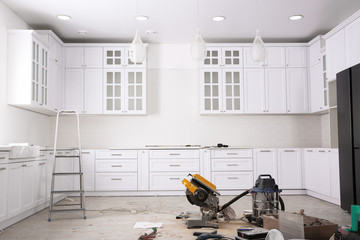
Kitchen Remodeling Timeline – How Long Does Each Phase Take?

J&R Construction

If you’re considering a kitchen remodel, it’s important to understand the process and timeline. Whether you’re doing a complete renovation or a minor upgrade, the right plan makes all the difference.

Careful planning at this stage prevents costly delays down the road. For example, countertop templating can’t begin until the cabinets are installed, and electrical work cannot take place until flooring is finished. Contact J&R Construction for more details.

Cabinet Installation

The cabinet installation process is a critical kitchen remodeling timeline phase. Depending on your kitchen remodel scope, this step could take up to a week or more. This is why it’s important to plan out your project with a kitchen designer, especially if you’re adding or removing walls. This allows you to turn your dream into a realistic plan with goals that are both attainable and measurable.

Before beginning cabinet installation, your installers will check the walls for level surfaces and mark high or low spots that may need shimming. They’ll also note utility locations to make sure that cabinets don’t interfere with water, gas, and electrical lines. This prep work typically adds a day or two to the cabinet installation timeline.

Once the kitchen cabinet installation is complete, it’s time for countertop and backsplash installation. Countertops are usually made to order, and they require a longer turnaround time than stock countertops. Then, your plumbing and electricity will be hooked up. Once all of the appliances are connected, you can finish up any trim or paint touch-ups.

This kitchen remodeling timeline stage is a bit trickier to pin down, but it’s important to factor in the amount of time your contractor will spend ordering and waiting for materials and fixtures. Some products, like a new sink or stove, may be back-ordered for weeks, and that can throw off your entire project. To prevent delays, it’s best to set up a clear communication system with your contractors and to be available to answer questions quickly.

If you’re looking for a more streamlined cabinet installation process, consider having your cabinets refaced rather than replaced. This option can save you a significant amount of money while still providing a fresh new look. For a similar effect, you can also install a new backsplash and counters with a much shorter timeline. This is a great option if you’re on a tight budget but want to give your kitchen a quick update.

Countertop Installation

One of the most significant changes a homeowner can make to their kitchen is resurfacing the countertops. This is a critical step that can make the difference between an outdated, boring room and a functional space for cooking, dining, and gathering with family and friends.

However, countertop installation can be delayed by factors like weather and material availability. It’s important to discuss material selection and delivery timelines with your kitchen designer during the planning process, so you can anticipate any potential hiccups that could throw off your project schedule.

During the countertop installation process, your contractor will remove and install the new worktops, and connect the sink and faucet. They’ll also seal the seams and make any necessary adjustments to ensure a seamless, beautiful final result. This is a great time to consider adding a backsplash, which adds another layer of style to your kitchen.

Countertop installation takes longer than some homeowners might expect, especially if they’re working with a more dense material like granite or quartz. First, a fabricator must accurately measure your existing countertops, then create a template for the new ones based on those measurements. This can take up to a day or more depending on your kitchen size and the complexity of the countertops you’re installing.

If you’re doing a full kitchen remodel, this is the time to do any structural upgrades or electrical work that may be required. This might include rerouting plumbing or reinforcing walls to accommodate new fixtures and appliances. This is also the time to update your electrical panel and wiring if needed, which can be a lengthy process in older homes.

Once the cabinets and countertops are installed, your contractor will add finishing touches like cabinet hardware and crown molding, do touch-up paint jobs where needed, and level all appliances. They’ll also install a backsplash if you’ve chosen to include one, and complete any other details like resealing the seams in the counters. Then, you’ll be ready to enjoy your brand-new kitchen!

Flooring Installation

The flooring installation phase can make or break your kitchen remodel timeline. It’s one of the most important decisions you can make and it will impact your budget, design and overall kitchen remodel timeline. It’s recommended that you take some time to visit flooring showrooms and order samples so you have plenty of options before making a decision. It’s also wise to schedule your flooring installation during a slow season when backlogs are less likely and your installer may be able to get started sooner.

This stage is usually longer than you might expect because materials like cabinets, counters and flooring need to be ordered and delivered before they can be installed. This can add up to a few weeks or even a few months depending on the products you choose and current lead times. If you’re working with a custom cabinetry company or ordering stone, tile or hardwood floors, lead times can be significantly longer.

Intricate patterns and custom designs can significantly increase installation time as well. Lastly, subfloor preparation can add days or even weeks to the process if it’s required before installation.

Once cabinets and countertops are installed, appliances can be connected, plumbing and electrical fixtures can be reconnected, and lighting can be added. It is important to have a good line of communication with your designer at this point to ensure all questions are answered and any changes can be made before moving forward. This is because changing your mind mid-remodel can throw off the entire schedule and cause costly delays that you might not have been expecting.

This final stage may seem chaotic, but it’s actually a carefully-orchestrated dance of plumbing, mechanical, electrical, duct, and insulation work, along with drywall, tile, painting and carpentry. Many things must happen in sequence (countertop templating can’t be done until cabinets are installed, for example) and it’s critical that all team members stay on the same page to avoid miscommunication and unnecessary delay.

Appliance Installation

A kitchen remodel takes time, especially if it’s a complete gut renovation. However, if you know the steps in advance and are realistic about your expectations, you can avoid delays that throw off the entire project.

The first step of a kitchen remodeling project is to evaluate the space and design an ideal kitchen layout. The design phase includes detailed planning to ensure every element supports your functional goals. This step may take a couple weeks to several months to finalize your plans and receive quotations for materials. If you’re planning to hire a general contractor, be sure to set aside ample time for interviews and quotes. Qualified contractors are often booked months in advance.

Rough construction is the next step in a kitchen renovation. This process includes demolition and building out structural features, such as framing. This typically takes one week or less, but can be longer for a complete kitchen gut remodel. This is also the time to make any electrical or plumbing changes. It’s essential to ensure gas and water lines are turned off and inspected by professionals before starting any work.

Cabinet installation is the largest part of this step. Depending on the style you choose and the number of cabinets, this could take up to a month or more. This is also the time to install new countertops and backsplashes. Be mindful of moving appliances so they don’t ding or scratch your new surfaces.

Once your cabinets are installed and the countertop is fabricated, you’ll be ready to move in. If you’re installing a back splash, this should be done at the same time as your countertops. This step is also when you can install lighting, plumbing fixtures and other finishes. Be sure to use caution when moving heavy appliances so they don’t ding your new countertops.

The last step is a thorough walkthrough to verify everything meets your expectations and is ready for use. This is your opportunity to catch any missed details or areas that need a little extra attention. Be sure to have any questions answered by your designer or contractor quickly to keep the project on track and avoid delays.